
A practical guide from 12 years of building Azure data platforms.
If you’ve spent any time working on Azure data platforms, you’ve probably hit this question at some point — should I build this in Azure Data Factory or just do it in Databricks?
I’ve been asked this by engineers on my team more times than I can count. And honestly, for a while, I didn’t have a clean answer either. After years of designing and delivering data platforms on Azure — migrating legacy ETL, building lakehouses from scratch, and reviewing a lot of pipelines — I’ve developed a pretty clear mental model for this. Let me share it.
First, understand what each tool is actually built for
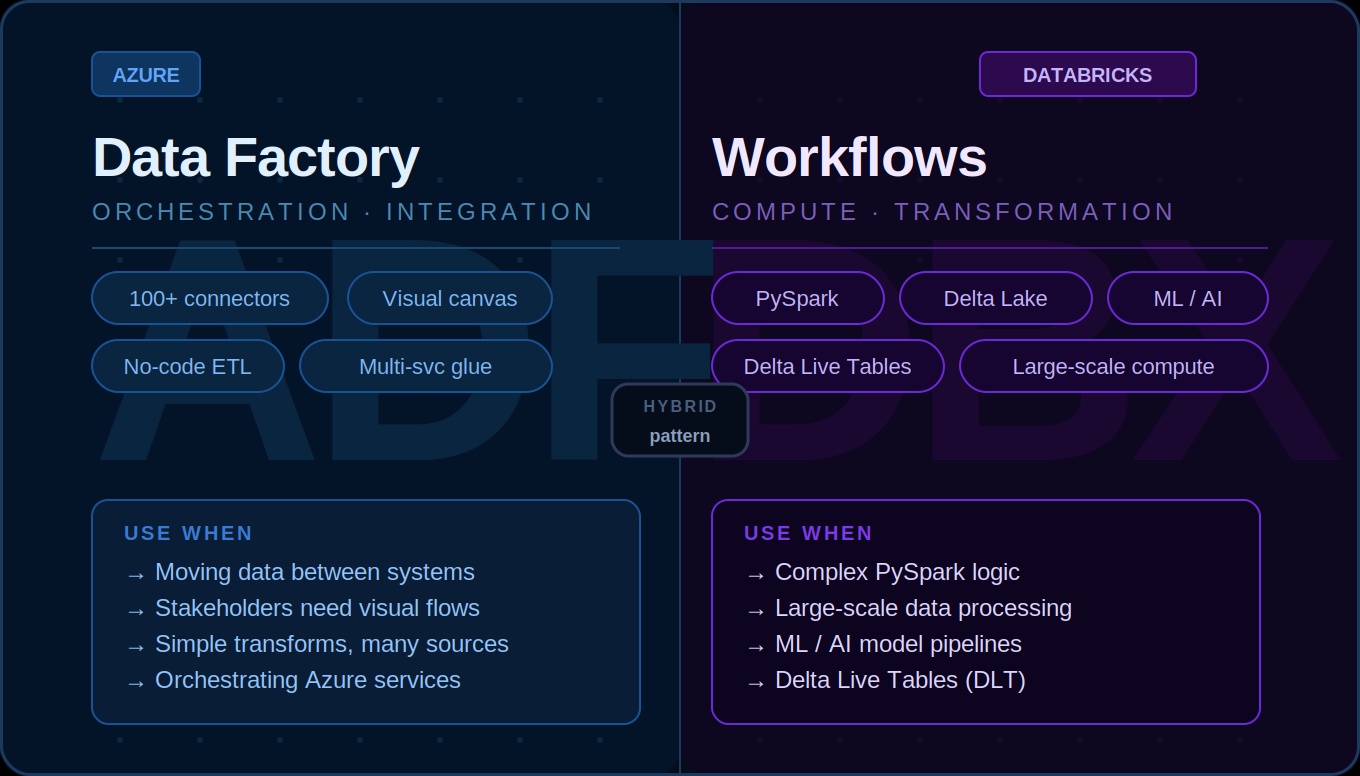
Azure Data Factory is an orchestration and data integration service. It’s designed to move data — between systems, across clouds, from on-prem to Azure. It has 100+ connectors out of the box, a visual drag-and-drop interface, and a built-in scheduling and monitoring layer. It’s not really a compute engine. It delegates the heavy lifting to linked services.
Databricks Workflows is a job orchestration layer built on top of the Databricks platform. It’s designed to run notebooks, Python scripts, SQL queries, and Delta Live Tables pipelines — all on Spark clusters. It’s compute-first, code-first, and built for engineers who are comfortable writing PySpark or SQL.
These two tools overlap in some areas but solve fundamentally different problems. The confusion usually happens in that overlap zone.
When ADF is the right choice
1. You’re moving data between systems — ADF’s connector library is massive. You don’t need to write a single line of code to pull data from most enterprise systems like Salesforce, SAP, Oracle, or REST APIs.
2. You need a visual pipeline for non-engineers — ADF pipelines are visual by nature. When you’re working with stakeholders or client teams who need to understand the data flow, an ADF canvas is much easier to walk through than a notebook.
3. You’re orchestrating across multiple Azure services — ADF is excellent at coordinating between services. Trigger a Databricks notebook, run a Synapse query, call an Azure Function, send a notification. Think of it as the glue.
4. Your transformations are simple — Lookups, filters, derived columns, basic aggregations. ADF’s Data Flow handles these well without code.
When Databricks Workflows is the right choice
1. Complex transformation logic — The moment you find yourself trying to express complex business logic in ADF’s expression language, stop. That way lies pain. Write it in PySpark.
2. Large-scale data processing — If you need fine-grained control over partitioning, caching, or broadcast joins, Databricks is where you want to be. I’ve seen pipelines cut from 4+ hours in ADF Data Flow to under 30 minutes with proper PySpark optimisation.
3. Code-heavy pipelines — If your team writes Python, your transformations are in notebooks, your tests are in pytest, and your repo is in Git, forcing everything through ADF adds unnecessary friction.
4. ML and AI pipelines — Feature engineering, model training, batch inference all live naturally in Databricks. Keep ML workflows end to end in Databricks.
5. Delta Live Tables — DLT for declarative pipelines with built-in data quality checks only runs in Databricks Workflows.
The hybrid pattern (what I actually use in production)
In most real projects, you don’t pick one or the other. You use both, with clear boundaries:
- ADF pulls raw data from source systems and lands it in the Bronze layer
- Databricks handles all transformation logic — Bronze to Silver, Silver to Gold
- For orchestration: pure Databricks chains use Databricks Workflows; multi-service pipelines use ADF as the outer orchestrator
There’s no universal answer. The right choice depends on what you’re trying to do. Once you have that mental model, the decision becomes quick and obvious most of the time.
If you’ve hit a specific scenario where you’re not sure which to use, drop it in the comments — happy to help you think it through.